



For years, game development was treated like a highly technical field reserved for programmers with expensive desktop computers, complex software pipelines, and years of coding experience. That perception is changing quickly. Modern tools, touch-first workflows, and no-code development platforms have opened game creation to a much wider audience. Today, creators can build playable games directly on an iPad, publish projects online, prototype ideas rapidly, and learn game design without writing traditional code.
This shift matters because creativity no longer depends on access to a high-end workstation or formal software engineering training. Students, hobbyists, educators, artists, musicians, content creators, and aspiring indie developers can now start building games from almost anywhere. One of the platforms leading this movement is hyperPad, a visual game development environment designed specifically for iPad.
This guide breaks down what game development actually involves, why iPad game development is now practical, how no-code compares to traditional coding, and how hyperPad enables creators to build real games using a visual workflow.
When most people hear “game development,” they immediately think of programming. In reality, game development is much broader.
A game is made up of several connected disciplines working together:
Game design defines how the experience works. This includes:
Even a simple platformer involves dozens of design decisions. How high can the player jump? How fast should movement feel? How often should checkpoints appear? These decisions shape the player experience more than graphics alone.
Games rely heavily on visual communication. This can include:
Some creators make their own art while others use asset packs or collaborate with artists.
Sound dramatically changes how games feel. This includes:
A simple jump sound or hit effect can make gameplay feel far more responsive and polished.
This is the “interactive” layer of game development. Logic determines:
Traditionally, this layer required coding. Modern no-code tools replace text-based programming with visual systems.
Professional game development is heavily iterative. Developers constantly:
The ability to quickly test and revise ideas is one of the biggest advantages of mobile-first game development tools.
A decade ago, creating games on a tablet sounded unrealistic. Hardware limitations, weak software ecosystems, and limited input systems made serious development difficult.
Today, the situation is very different.
Modern iPads are powerful creative devices capable of handling:
Several major changes helped make this possible.
Traditional game engines were designed around mouse-and-keyboard workflows.
Touch-first systems change how creators interact with tools.
Dragging objects, resizing assets, arranging scenes, connecting behaviors, and testing gameplay directly with touch controls often feels more intuitive, especially for beginners.
For younger creators and students, touch interaction removes much of the friction associated with learning desktop software.
This accessibility matters because many people interested in game creation are not professional programmers.
One of the biggest advantages of iPad development is portability. A creator can:
Traditional game development often requires sitting at a workstation for long periods. iPad workflows make development feel more flexible and approachable.
For creators balancing school, work, or other responsibilities, this flexibility significantly lowers the barrier to consistent progress.
Touch-based workflows combined with visual logic systems make experimentation extremely fast. Instead of:
Creators can often:
That rapid feedback loop is incredibly valuable when learning design.
Desktop game development can become expensive. A typical setup might require:
Many creators already own an iPad for school, art, media, or general productivity. Platforms like hyperPad turn an existing device into a game development environment.
For students and younger developers, this can make game creation far more accessible.
Another reason iPad game development is growing is the rise of tools designed specifically for creators rather than engineers. Older development tools assumed users already understood:
Modern no-code platforms focus on:
This shift allows creators to focus more on ideas and less on technical overhead.
A common misconception is that no-code and coding are enemies.
In reality, they solve different problems for different types of creators.
Traditional game development uses programming languages such as:
Coding offers:
Professional studios often require programming for large-scale productions.
However, coding also introduces major complexity.
New developers often spend months learning:
For many beginners, this slows creative momentum.
Instead of designing games, they spend most of their time troubleshooting errors.
No-code systems replace traditional scripting with visual logic.
Instead of typing commands, creators:
This approach makes game systems easier to understand conceptually.
No-code development is ideal for:
It enables creators to focus on gameplay and design immediately.
Many successful game concepts start with rapid prototyping rather than deep engineering.
No-code tools are not perfect for every scenario.
Highly specialized systems or large-scale enterprise projects may eventually require custom programming.
However, for learning game development, building indie projects, testing mechanics, creating educational experiences, and publishing smaller games, no-code platforms are extremely effective.
If your goal is:
No-code is often the fastest and most accessible starting point. If your goal is:
Traditional coding may eventually become necessary.
The important thing is that no-code is not “less real.”
A finished, playable game created visually is still a real game.
hyperPad is a no-code game development platform built specifically for iPad.
Instead of writing code, creators use a visual workflow to build interactive games.
The platform focuses on accessibility, speed, and touch-first design.
Games in hyperPad are built using scenes.
A scene might represent:
Creators visually place objects into scenes and configure how those objects behave.
This structure mirrors how professional game engines organize projects while remaining beginner-friendly.
Every game element is treated as an object.
Objects can include:
Creators can import artwork, use custom graphics, or combine existing assets.
Objects can then be resized, positioned, animated, and connected to gameplay systems.
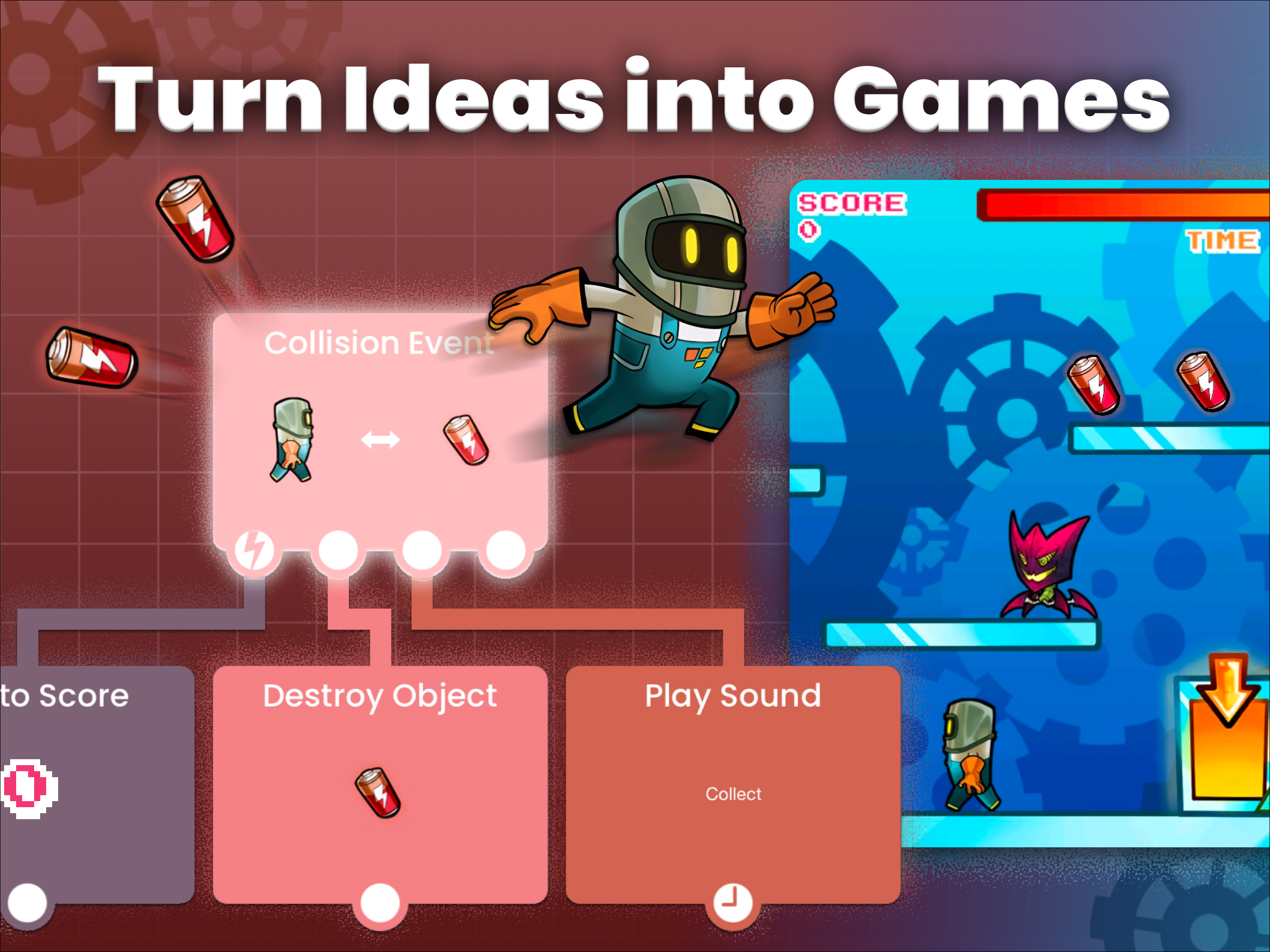
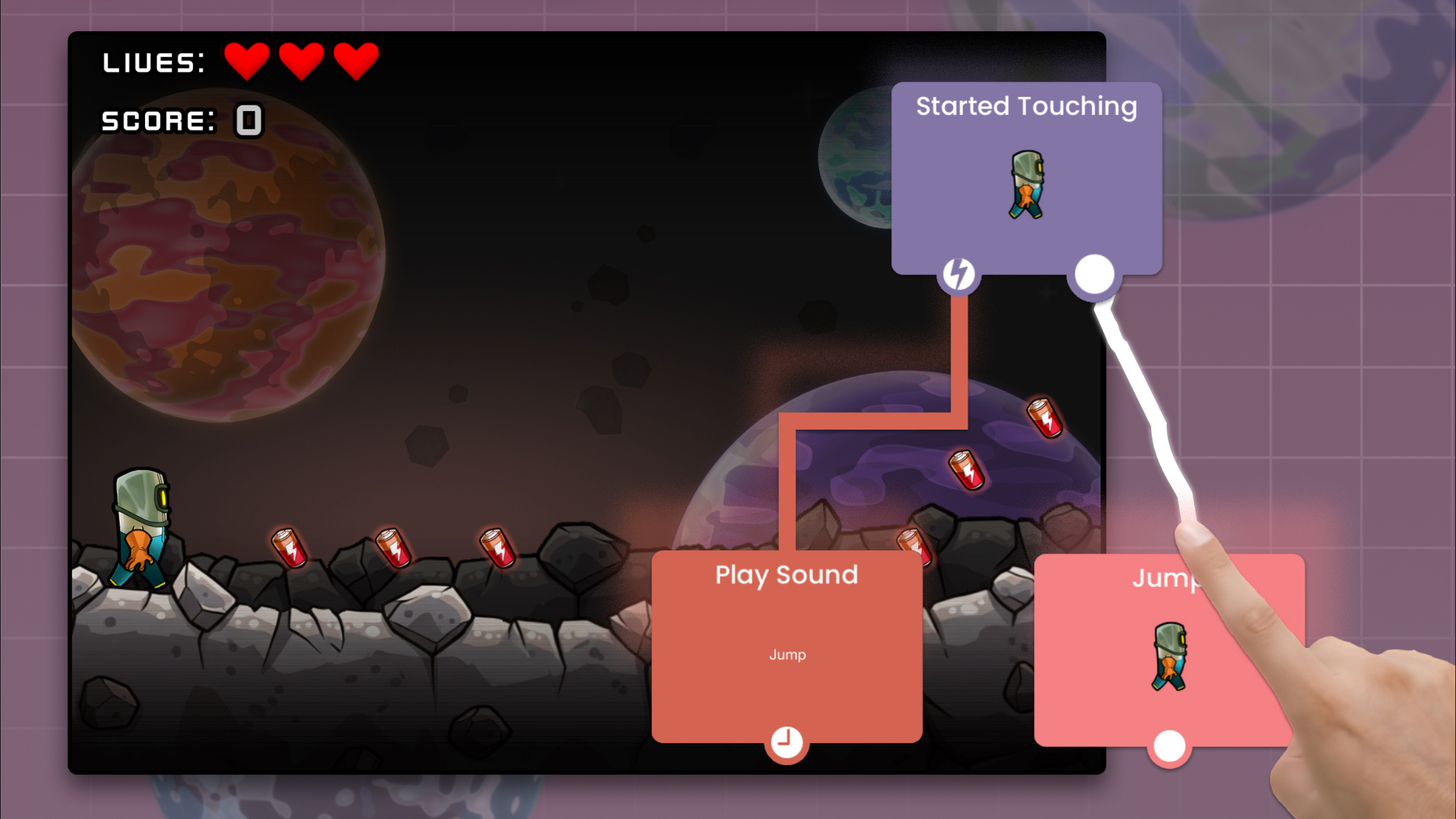
The core of hyperPad is its behavior system.
Behaviors act like visual programming blocks.
Instead of writing:
“if player touches enemy, reduce health by 1”
Creators configure behaviors visually.
This system makes gameplay logic easier to understand because relationships are visible rather than hidden inside code. Behaviors can control:
As projects grow, creators can combine behaviors into surprisingly advanced systems.
One of hyperPad’s biggest strengths is rapid iteration.
Creators can test gameplay quickly, adjust values immediately, and continue refining mechanics without leaving the iPad workflow.
This encourages experimentation. A creator might:
That fast feedback loop helps beginners learn much faster.
Creating a game is only part of the process.
Sharing projects matters too.
hyperPad allows creators to:
This social aspect is important because feedback accelerates learning.
Many developers improve quickly after other players interact with their games.
One of the strongest aspects of visual game development is versatility.
Creators are not limited to a single genre.
Here are several popular game types that work especially well.
Platformers are one of the most beginner-friendly game genres.
They teach core concepts such as:
A simple platformer project helps creators understand how interactive systems connect together.
Creators can build:
Because platformers are relatively approachable, they are often an excellent first project.
Rhythm games focus heavily on timing, feedback, and audio synchronization.
These projects are ideal for creators interested in music-driven experiences.
A rhythm game project teaches:
Many creators enjoy recreating mechanics inspired by popular rhythm games because they combine music, animation, and gameplay in an engaging way.
Physics-based games are another strong fit for visual development.
Sandbox projects can include:
Physics experimentation is especially fun in touch-based environments because creators can directly interact with objects while testing.
These projects are also excellent for learning emergent gameplay design.
Puzzle games work extremely well with no-code systems.
Creators can focus on:
Simple mechanics often lead to highly engaging gameplay.
Not every game needs combat or advanced mechanics.
Some creators use hyperPad to build:
Visual workflows make these projects especially approachable.
Starting game development becomes much easier with guided tutorials and reusable assets.
Here are several resource categories worth exploring.
Rhythm-game tutorials are excellent for learning:
If you are interested in building rhythm games inspired by Friday Night Funkin’-style mechanics, tutorial breakdowns can help demonstrate how visual logic systems are structured.
These tutorials are especially valuable because they combine multiple gameplay systems into one cohesive project.
Assets dramatically accelerate development.
A strong asset library may include:
Using high-quality starter assets allows creators to focus more on gameplay rather than spending months producing every visual element from scratch.
Asset collections are also extremely useful for beginners who want to prototype quickly.
One of the best ways to learn is by studying existing games.
Community projects help creators understand:
Reverse engineering projects is a powerful educational method.
A highly effective learning strategy is creating small projects with strict limitations.
Examples include:
These constraints force creators to focus on core gameplay rather than over-scoping.
The barrier to game development has never been lower.
A creator can now build real playable games with:
This accessibility matters because creativity often develops through iteration.
Many successful developers started with:
The important step is starting.
No-code development allows creators to begin learning design principles immediately instead of waiting until they “know enough programming.”
That momentum is valuable.
Mobile hardware continues to improve rapidly.
As iPads become more powerful and creator-focused software evolves, the line between desktop and mobile development workflows will continue shrinking.
Future creators may increasingly:
This evolution mirrors broader trends across digital creativity.
Video editing, illustration, music production, and 3D workflows have all become increasingly mobile-friendly.
Game development is following the same path.
If you have been curious about making games but felt intimidated by programming, complex software, or expensive hardware, this is an ideal time to start.
hyperPad provides a practical entry point into game development using a visual workflow designed specifically for iPad creators. You can:
The best way to learn game development is by building.
Start with a small idea.
Create a basic platformer.
Experiment with a rhythm mechanic.
Build a physics sandbox.
Every completed project teaches valuable skills.
Try the hyperPad Starter version to begin experimenting with game development on iPad.
If you are ready for expanded features, advanced workflows, and full project capabilities, upgrade to the Complete Version and start building larger games.
The tools are more accessible than ever. Now it is about turning ideas into playable experiences.
Be the first to hear about new blogs, updates and fun events!