

If you want to make games on iPad, Scratch is usually one of the first tools people discover. It is beginner-friendly, visual, and easy to understand.
But Scratch was originally designed around desktop browsers. On iPad, many creators eventually run into limitations with performance, publishing, controls, exporting, or project complexity. That is why more students, hobbyists, educators, and indie creators are searching for better alternatives to Scratch for iPad.
This guide breaks down the best options available in 2026, including which platform is best for:
We will also explain why iPad game development has become significantly more viable over the past few years.
Scratch is excellent for learning programming logic. It introduced millions of people to variables, events, loops, conditions, and sequencing.
However, iPad creators often reach a point where they want more flexibility. Common reasons people search for Scratch alternatives include:
Scratch was not originally designed as a native iPad-first game engine.
Many creators want:
Scratch projects mostly stay inside the Scratch ecosystem.
Creators eventually want to:
As creators improve, they often want:
One of the biggest advantages of iPad development is portability.
Many users want to:
Modern iPads are now powerful enough to support surprisingly capable game creation workflows.
Not every visual coding platform works well on tablets.
The best iPad-friendly alternatives usually include:
Desktop-first tools often feel awkward on iPad.
Good iPad tools prioritize:
Scratch popularized block-based logic.
The best alternatives build on this idea with:
Strong alternatives usually support:
Creators increasingly want:
The ideal platform should still feel approachable.
A steep learning curve defeats the purpose for many beginners.
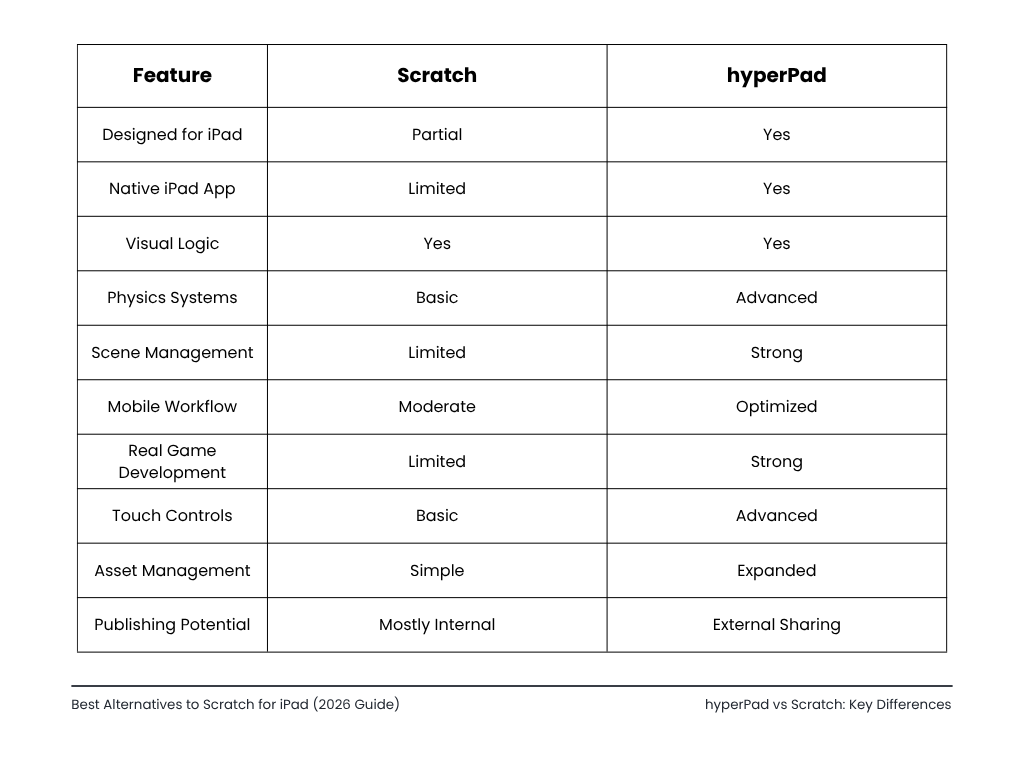
hyperPad is one of the strongest Scratch alternatives specifically designed around iPad workflows.
Unlike many browser-based tools, hyperPad was built directly for touchscreen game creation.
That makes a major difference in usability.
hyperPad feels significantly more natural on iPad than desktop-first tools.
The editor supports:
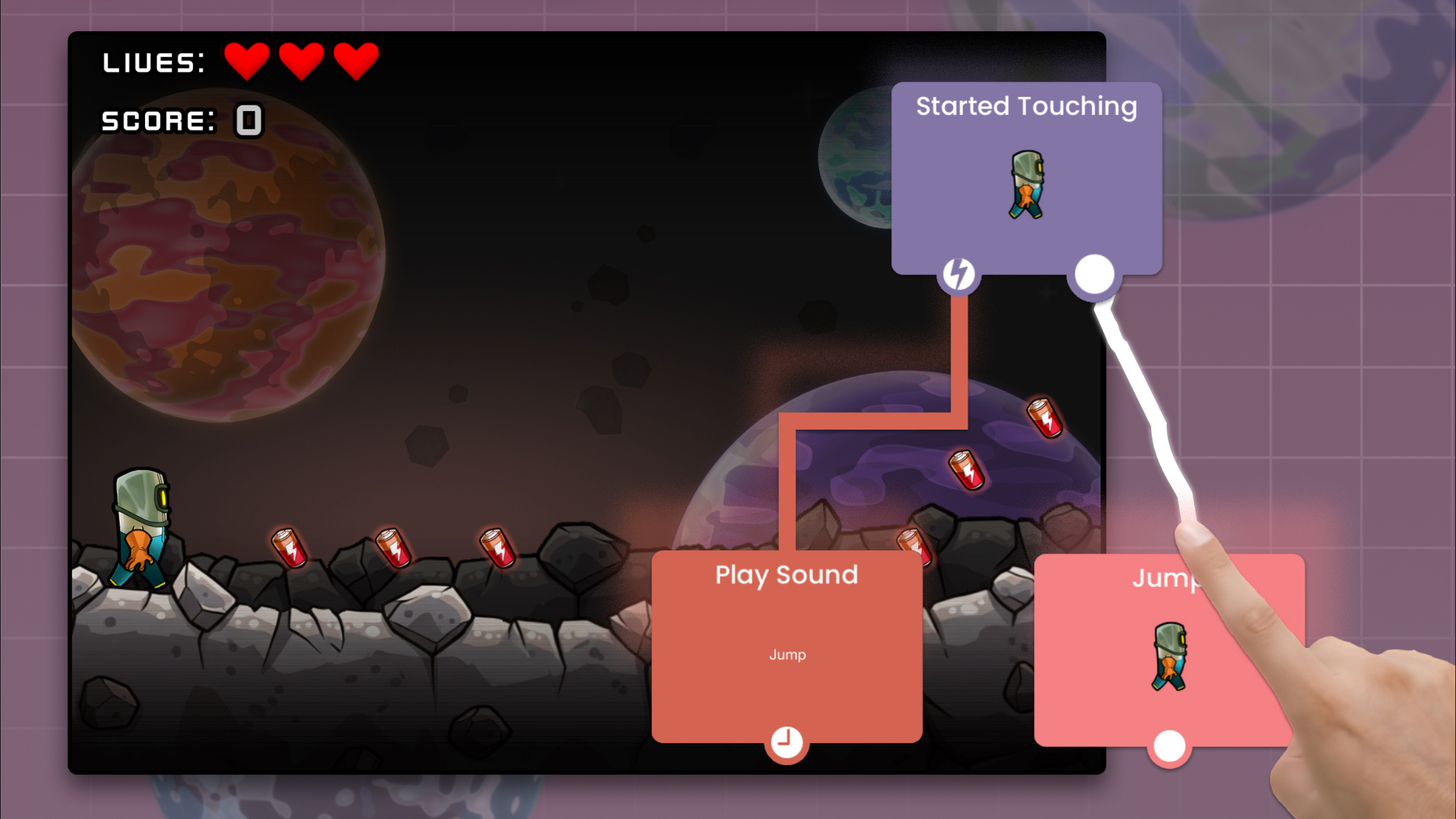
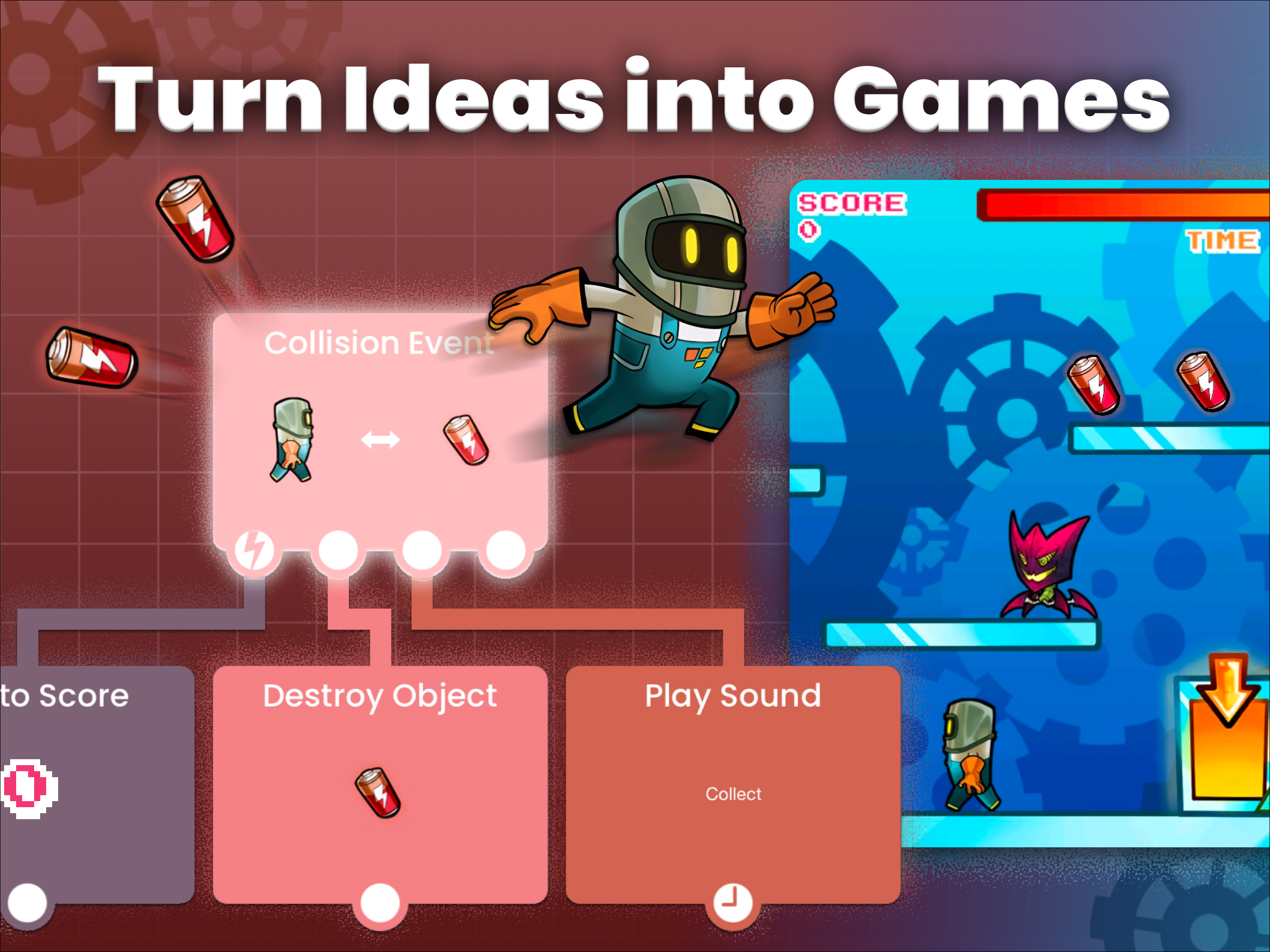
Like Scratch, hyperPad uses visual logic.
Instead of typing traditional code, creators connect behaviors and events together.
This allows beginners to build:
without needing to learn a programming language first.
hyperPad is often used after creators outgrow Scratch.
Key advantages include:
One major difference is intent.
Scratch is primarily educational.
hyperPad focuses on actual game development workflows.
That makes it useful for:
Because hyperPad combines visual logic with real game systems, it works well in educational environments.
Students can learn:
without the intimidation of traditional coding syntax.
GDevelop is another popular no-code game engine.
It supports event-based logic similar to visual scripting systems.
Compared to Scratch, GDevelop offers:
However, the experience is generally stronger on desktop compared to iPad.
Some creators use iPad for light editing, then move to desktop for larger projects.
Hopscotch has been one of the more popular iPad coding apps for beginners.
It focuses heavily on accessibility and learning.
The interface is approachable and beginner-friendly.
Hopscotch works well for:
Compared to newer game creation tools, Hopscotch can feel limited for larger-scale projects.
Creators who want:
may eventually transition to platforms like hyperPad or desktop engines.
Construct is a well-known visual game engine.
It uses event-sheet logic rather than traditional programming.
Many creators appreciate:
Construct can run on iPad browsers, but the workflow still feels more desktop-oriented.
For extended touch-based editing sessions, some creators prefer native iPad-focused tools.
Roblox Studio itself is not a full iPad development environment.
However, many Scratch users eventually transition into Roblox development because:
The tradeoff is complexity.
Roblox development eventually requires scripting with Lua.
That makes it less beginner-friendly compared to fully visual systems.
Yes.
Scratch remains one of the best introductions to programming logic.
It teaches:
For absolute beginners, Scratch is still valuable.
But many creators eventually reach a stage where they want:
That is where modern alternatives become important.
A few years ago, serious game development on iPad was considered difficult.
That perception has changed.
Modern iPads now support:
This has created a strong environment for mobile-first creators.
For students and beginner developers, iPad development also reduces barriers.
Instead of needing:
creators can begin building games directly from a tablet.
That accessibility is one reason no-code game engines continue growing rapidly.
For creators focused specifically on iPad game development, hyperPad is one of the strongest options because it was designed around touchscreen workflows rather than adapting desktop systems to mobile.
Yes.
Modern no-code engines and visual scripting platforms now allow creators to build surprisingly advanced 2D games directly on iPad.
Yes.
hyperPad uses visual behaviors instead of traditional coding syntax, making it approachable for beginners while still supporting more advanced game systems.
Tools like hyperPad, GDevelop, and Construct generally offer stronger game development systems, larger project support, and better publishing workflows.
No.
Several modern platforms support no-code or visual scripting workflows that allow creators to build games using events, behaviors, and logic systems instead of typed programming languages.
Scratch remains one of the most important beginner programming platforms ever created. But iPad game development has evolved significantly.
Today, creators can move beyond simple educational projects and build much more capable games directly from a touchscreen device. For users specifically searching for a Scratch alternative optimized for iPad, hyperPad stands out because it combines:
As iPad hardware continues improving, the line between tablet creation and desktop development will continue shrinking. For many beginners, students, and indie creators, that shift is already happening.
Be the first to hear about new blogs, updates and fun events!